
Before we begin, I would like to go over the basic tools and menus that we will be using for this course.
Part 1: The Procreate Interface
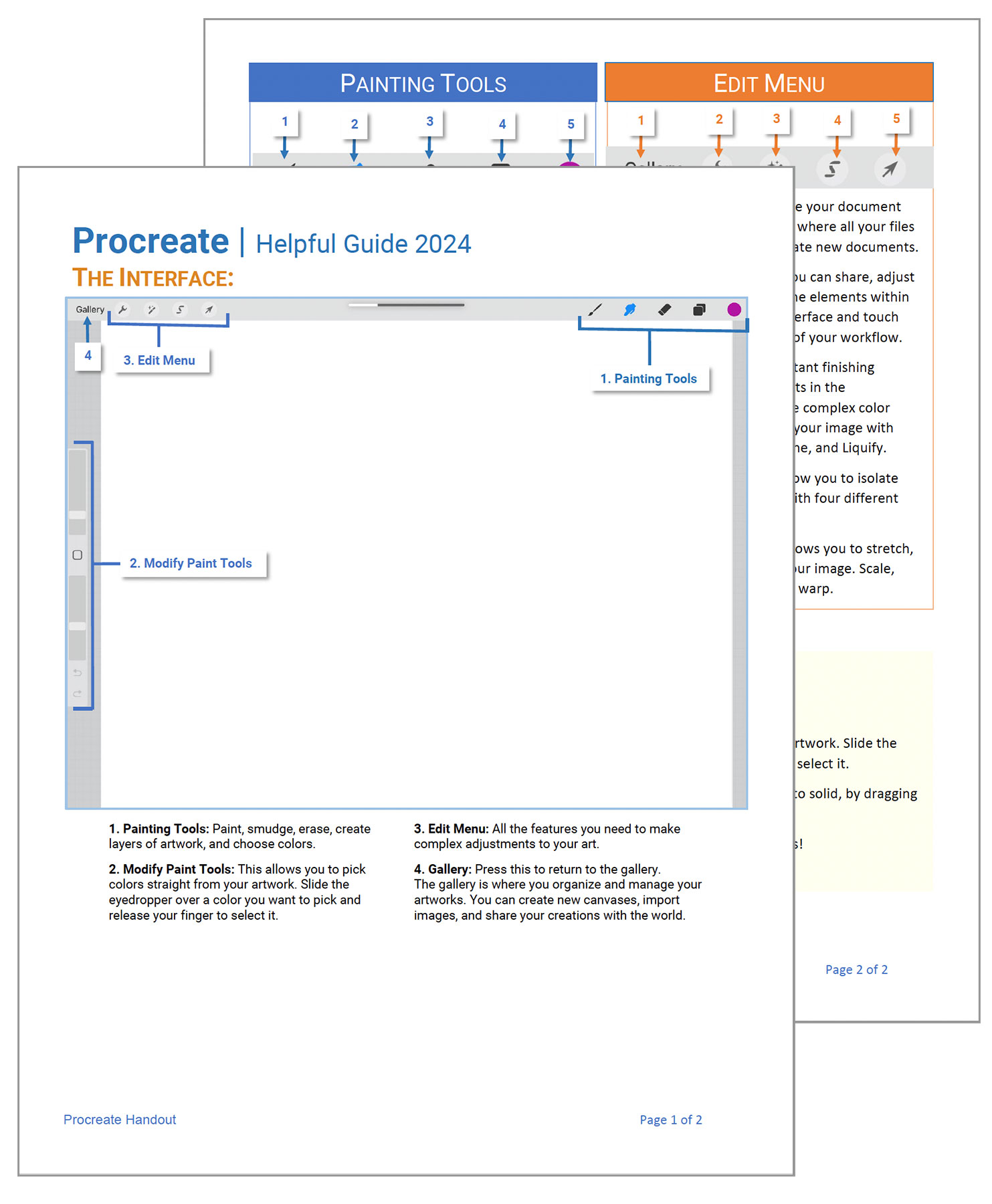
First, we will lookat Procreate’s interface. In addition to the video, I have also prepared ahandy guide for you to refer to as we go through the course.
Part 2: Create the Right Canvas
In this lesson you will learn how to set the optimum resolution and dimension for fine artwork – especially if you hope to print your work out later or sell it on products.
Part 3: The 3 Primary Drawing Tools
There are 3 primary drawing tools you will need for anything you create. They are the paintbrush, smudge, and erase tool. Learn what they are and how to use them in coordination with one another, so that you can create a consistent look in your drawings.
Part 4: The 5 Color Panels
There are a variety of color panels available in Procreate. Let’s learn what they are and how to work with them.
Part 5: How to Download Images
Learn how to download images to the iPad and use them for drawing.
Part 6: Working with Layers
Layers are the power of working with any good digital painting application. Thus, I felt it important to get you started right away on layers and teach you some of the basics.
Hopefully I covered the basic information you will need for this course, however, if you find you still get stuck, please refer to the: Procreate Handbook for more information.